


Last updated: October 2026.
Quick answer: The email warmup settings Mailivery recommends: warm up every mailbox for 1 month before your first campaign (2 weeks minimum), match warm-up volume 1:1 to your daily cold volume (50 a day max on Google and Microsoft), set a 35 to 40% reply rate, use Fast ramp-up for new mailboxes and keep the audience on Both.
After connecting a mailbox to Mailivery, most people ask our team the same question: "What should I set these to?" The settings screen gives you a field for emails per day, a slider for reply rate and a ramp-up toggle, and the right numbers depend on the mailbox you're warming. A Google Workspace inbox sending 20 cold emails a day needs different settings than a Maildoso SMTP mailbox sending the same 20.
If you're new to warm-up, start with our email warmup guide, which explains how warm-up builds sender reputation. This post assumes your mailbox is connected and covers what to put in each setting. These are the same numbers we give customers on onboarding calls.
| Setting | Google Workspace / Microsoft 365 | Custom SMTP (Winnr, Maildoso, others) |
|---|---|---|
| Warm-up emails per day | 1:1 with daily cold volume, 50 max | 1:1, up to 2x cold volume |
| Not sending cold yet | 25 a day | 25 a day |
| Reply rate | 35 to 40% | 35 to 40% |
| Ramp-up | On, Fast (14 days), for new mailboxes | On, Fast (14 days), for new mailboxes |
| Warm-up duration | 1 month recommended, 2 weeks minimum | 1 month recommended, 2 weeks minimum |
| Warm-up audience | Both (default) | Both (default) |
| Warm-up topics | Your industry | Your industry |
| Custom templates | Optional | Optional |
| Blacklist monitoring | On | On |
| Inbox placement test | Before your first campaign, then regularly | Before your first campaign, then regularly |
Your domain's existing reputation can shift these numbers. Use them as your starting point, then adjust based on your spam rate and placement tests.
Warm-up emails per day is the number of warm-up emails a mailbox sends into the Mailivery network each day. Mailboxes in the network open those emails, move them out of spam and reply, and Gmail and Outlook count each of those actions as positive engagement for your sender.
Our rule is one warm-up email for every cold email. If a mailbox sends 25 cold emails a day, set warm-up to 25. At 1:1, your mailbox earns a positive interaction for every cold email it sends.
Google Workspace and Microsoft 365 mailboxes perform best at low, steady volume. Most senders on those providers keep cold outreach at 20 to 25 emails a day per mailbox, so warm-up lands in the same range. Cap warm-up at 50 a day per mailbox. If you need more volume, add mailboxes instead of pushing more through one.
Microsoft mailboxes tend to send fewer cold emails than Google mailboxes, so at 1:1 their warm-up comes out lower too. Our post on warm-up emails per day for Outlook covers Microsoft's limits in more detail.
If the mailbox isn't sending cold email yet, start warm-up at 25 a day.
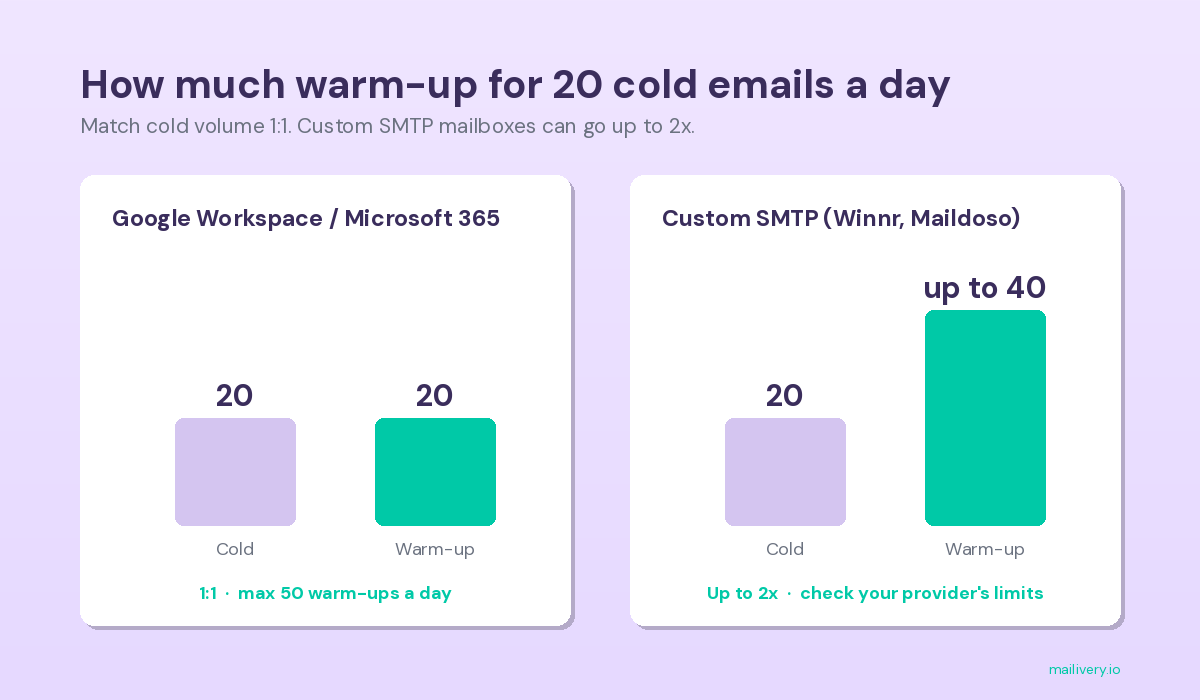
SMTP warmup starts from the same 1:1 rule, with more room above it. Cold email infrastructure providers like Winnr and Maildoso run their own IPs. A well-managed SMTP IP still won't carry the reputation of a Google IP, so you make up the difference with extra warm-up.
With a custom SMTP mailbox, you can run up to twice your cold volume in warm-up. If you send 20 cold emails a day, you can set warm-up as high as 40 and spread it across the day. Check your SMTP provider's recommended limits before you go above 1:1. If you're unsure, stay at 1:1.
Reply rate is the percentage of your warm-up emails that get a reply from the network. At 25 warm-ups a day and a 40% reply rate, about 10 of your emails get a reply each day. A reply is one of the strongest positive signals a mailbox can earn. Our post on reply rate and deliverability explains how inbox providers read replies.
We recommend starting at 35 to 40%, with 55% as the upper end. A real business mailbox doesn't get replies on most of what it sends, and Gmail and Outlook know what normal looks like. Some tools push warm-up reply rates to 80%, and we don't recommend it.
Raise your reply rate when your spam rate climbs. If you've been sending cold email for a few weeks or months and your spam rate starts rising, a higher reply rate gives the mailbox stronger engagement while its reputation recovers. Otherwise, keep it steady.
Ramp-up starts warm-up at low volume and raises it each day until it reaches your target. A new mailbox that jumps to 30 warm-ups on day one looks unnatural to inbox providers. With ramp-up on and a target of 30, Mailivery starts around 10 a day and climbs to 30 over the period you choose.
Mailivery has three ramp-up speeds: Fast (14 days), Normal (30 days) and Slow (60 days). We recommend Fast for most mailboxes. Turn ramp-up on when:
For a day-by-day view of the first month, see our email warmup schedule.
Warm-up duration is how long a mailbox runs warm-up before it sends its first cold campaign. We recommend 1 month for every mailbox, whether it runs on Google Workspace, Microsoft 365 or custom SMTP. Two weeks is the minimum.
Fast ramp-up takes 14 days to reach your target volume, so a 2-week warm-up ends right as the mailbox hits full speed. With the extra two weeks, Gmail and Outlook see a full month of steady, positive engagement before your first cold email goes out. If your launch date is fixed, count back 30 days and connect the mailbox then.
Warm-up audience controls which inboxes receive your warm-up emails. You can pick business mailboxes (Google Workspace and Microsoft 365), consumer mailboxes (Gmail, Yahoo and Outlook.com) or both.
Leave it on Both, the default, unless you only email one type of recipient. Choose Business only if your outreach is B2B. Choose Consumer only if you only email personal addresses, which is common for newsletters and B2C brands. Many warm-up networks only include business mailboxes, so B2C senders using them get no warm-up on the inboxes their customers use.
Warm-up topics set the subject matter of your warm-up conversations. By default, Mailivery covers a wide range of general topics like sales and customer service. You can pick your industry and topic when you start warm-up, so the conversations sit closer to what you send.
Custom templates add your own email copy to the warm-up mix. The network opens and replies to those emails like any other warm-up email, so inbox providers see engagement on your real content before your campaigns go out. Custom templates make up about 20% of your warm-up volume, blended in with Mailivery's standard templates.
Most senders can skip this setting. Add your copy if you work in a regulated industry like finance or insurance, where your emails use language that general warm-up conversations don't.
Two more tools round out the setup, and both come with every Mailivery plan.
Blacklist monitoring checks your sending domains against major blocklists like Spamhaus and alerts you when a domain lands on one, so you can act before your next campaign goes out. Turn it on for every domain you send from. Our rundown of the top email blacklists explains which listings matter most.
An inbox placement test sends your email to Mailivery's seed network and shows where it lands at each provider: inbox, spam or promotions. Run one after warm-up and before your first campaign, then run another whenever you want a pulse on your reputation.
Watch your spam rate to decide when to move off the defaults. Mailivery shows each mailbox's spam rate over the last 14 days. Under 5% is healthy, and under 1% is the goal.
Keep warm-up running after your campaigns start. Reputation fades when positive engagement stops, so warm-up should run for as long as the mailbox sends cold email.
Mailivery recommends matching your daily cold email volume 1:1. If a mailbox sends 25 cold emails a day, set 25 warm-up emails. Keep Google and Microsoft mailboxes at 50 warm-ups a day or less, and start at 25 if the mailbox isn't sending cold email yet.
Start at 35 to 40%. That range builds positive engagement while staying close to what a real mailbox sees. Raise it toward 55% only if your spam rate starts climbing.
Use 1:1 for Google Workspace and Microsoft 365 mailboxes. Custom SMTP mailboxes can go up to 2:1 (two warm-ups per cold email) if your SMTP provider's limits allow it. For any mailbox, 1:1 is the safe default.
Mailivery recommends 1 month of warm-up before your first cold campaign, and 2 weeks is the minimum. The same rule applies to every mailbox, including Google Workspace, Microsoft 365 and custom SMTP. Our post on how long it takes to warm up an email covers timelines by situation.
Yes. Mailbox reputation fades when positive engagement stops, and cold email alone won't produce enough replies to sustain it. Run Mailivery warm-up alongside your campaigns for as long as you send.
Most senders don't. Custom templates help in regulated industries like finance and insurance, where your copy uses language that standard warm-up conversations don't cover. In Mailivery, they make up about 20% of your warm-up volume.
Use the same 1:1 ratio for both. Microsoft 365 mailboxes tend to send fewer cold emails per day, so their warm-up volume ends up lower. Keep Google and Microsoft mailboxes at 50 warm-ups a day or less.
Yes. Mailivery connects custom mailboxes over SMTP and IMAP, including mailboxes from providers like Winnr and Maildoso. SMTP mailboxes can run up to twice their cold volume in warm-up, and you should check your provider's daily limits first.
Every Mailivery plan includes unlimited mailboxes, blacklist monitoring and inbox placement tests, so you can apply these settings across your whole sending setup. Start your 7-day free trial or see how Mailivery warm-up works.

The easiest way to get responses to your cold emails.
