

Getting the warmup schedule right is the difference between building real sender reputation and wasting weeks on a ramp that doesn't stick.
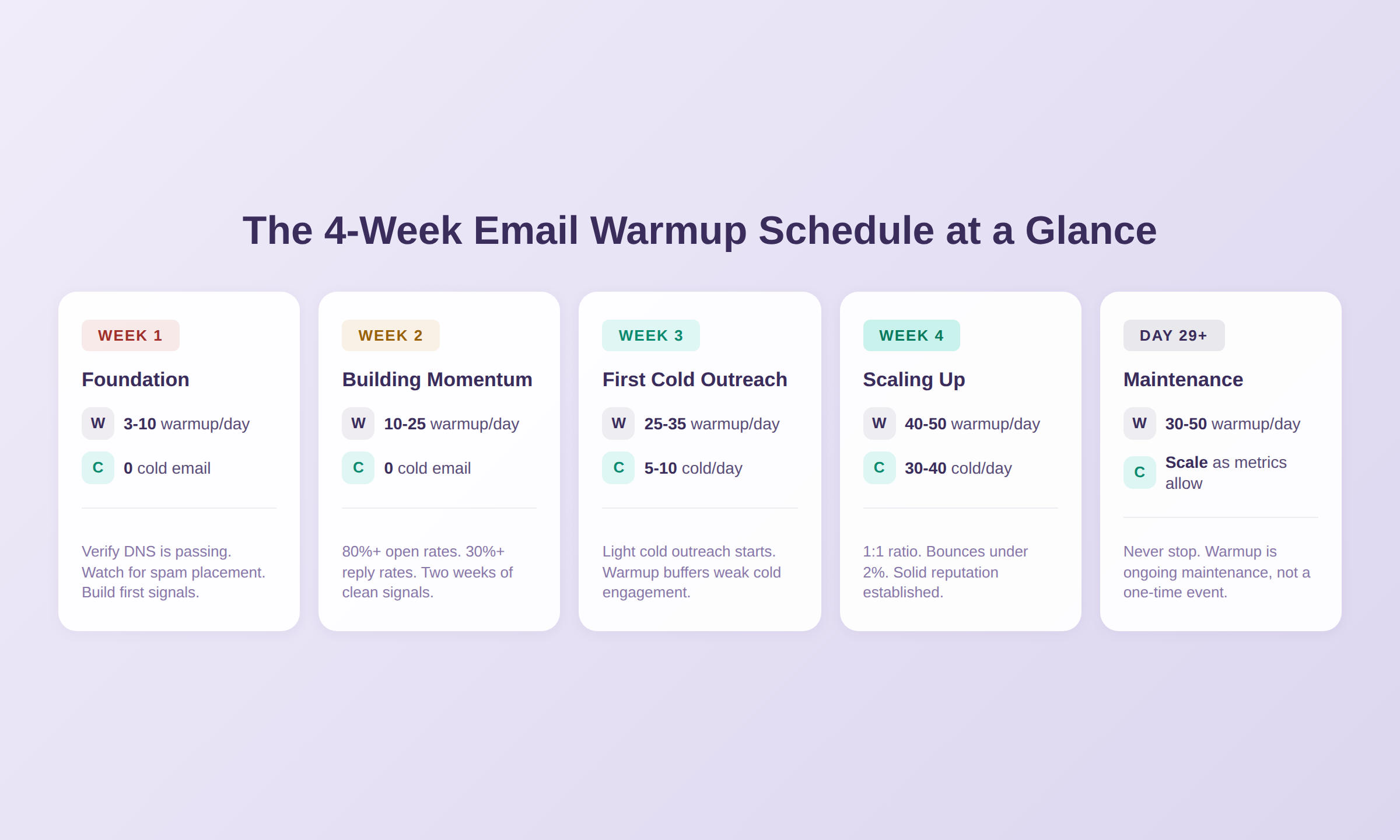
A safe email warmup schedule for cold outreach starts at 3 to 5 warmup emails per day per mailbox and ramps up gradually over 4 weeks, reaching 40 to 50 warmup emails per day per mailbox by the end. You should not send any cold email during the first two weeks. Light cold outreach (5 to 10 per day) can start around day 15, and by week four you can match your cold email volume to warmup at roughly a 1:1 ratio. The exact pace depends on whether your domain is brand new, recovering from reputation damage, or already has some positive sending history.
This guide gives you a concrete day-by-day schedule you can follow, explains how to adjust it based on your situation, and covers the signals that tell you when to speed up, slow down, or pause. For the full picture on how warmup works and why it matters, see our definitive email warmup guide.
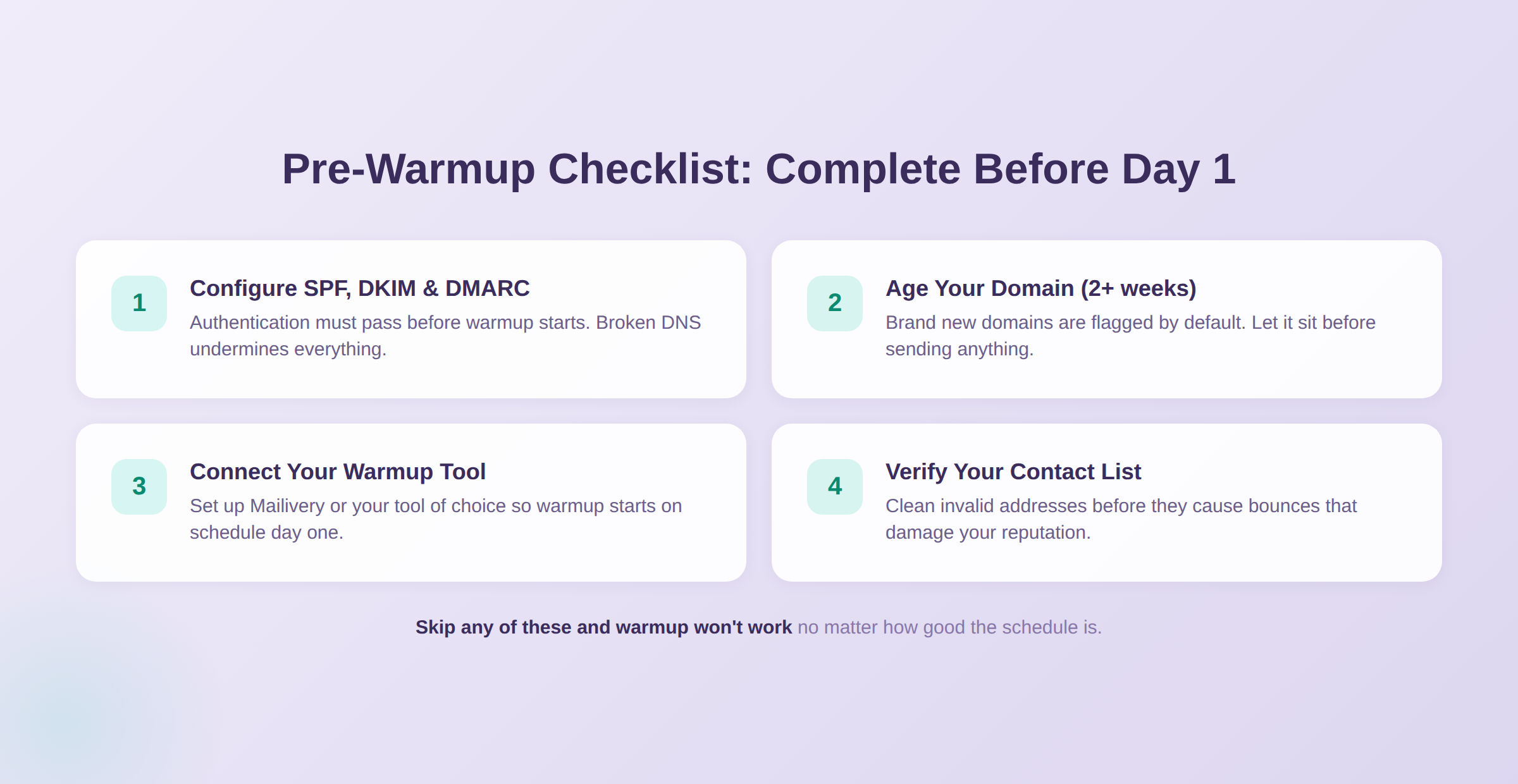
Starting a warmup schedule on a domain that isn't set up correctly is like training for a race in the wrong shoes. You can follow the schedule perfectly and still get bad results.
Before day one, make sure you've handled these:
This schedule is based on standard best practices across the cold email industry and our experience at Mailivery warming up thousands of inboxes. It works for most situations: new domains, new inboxes on existing domains, and domains recovering from deliverability issues.
All numbers are per mailbox per day. If you're warming up multiple mailboxes, each one follows this schedule independently.
This is the quiet week. You're telling Gmail, Outlook, and Yahoo that you exist and you're a normal sender. Nothing flashy.
Start with 3 to 5 warmup emails per day for the first few days, then ramp to 5 to 10 by the end of the week. Every email should generate a positive interaction: an open, a reply, a mark-as-important. This is what your warmup tool handles automatically.
What to watch: Confirm your SPF/DKIM/DMARC records are passing. You can use Gmail Postmaster Tools or check your warmup dashboard. Make sure warmup emails are landing in the inbox, not spam. If warmup emails hit spam in the first few days, something is wrong with your DNS setup, not your schedule.
Do not send any cold email this week. Your domain has no reputation yet.
A note on provider differences: Gmail tends to be stricter than Outlook during the early days of warmup. If you see warmup emails landing in spam on Gmail but not Outlook, that's not unusual. Gmail applies tighter scrutiny to new senders and takes longer to build trust. Stick with the schedule and give it the full two weeks before worrying. For more on how the two providers differ, see Gmail vs. Outlook deliverability.
Now you're increasing volume while maintaining strong engagement. Move from 10 to 15 emails per day at the start of the week up to 15 to 25 by the end.
By day 14, your domain has two full weeks of clean, consistent sending with high engagement rates. Providers are starting to recognize you as a legitimate sender. This is the minimum baseline before cold email enters the picture.
What to watch: Open rates on warmup should be 80%+. Reply rates should be 30% or higher. If either drops significantly, don't ramp volume further until they recover. Also keep an eye on your blacklist status just in case.
Still no cold email. Patience pays off here.
This is the week where things get real. You can start sending a small number of cold emails alongside your warmup.
Warmup volume: 25 to 35 per day. Cold email: start with just 5 to 10 per day. That might feel slow, but you're testing how your domain performs with real cold outreach for the first time. If recipients ignore your cold emails, your engagement metrics take a hit. The warmup emails running alongside act as a buffer, keeping positive signals flowing.
What to watch: Pay attention to how your cold emails perform, not just warmup stats. Are cold emails landing in the primary inbox or spam? Are you getting any replies? If cold email performance looks rough, don't ramp cold volume yet. Let warmup continue building your reputation while you tweak your cold email content. Reply rates directly impact your reputation, so low engagement on cold emails is a signal to fix content before scaling.
Warmup hits 40 to 50 per day. Cold email can now match your warmup volume, aiming for roughly a 1:1 ratio. So if you're sending 40 warmup emails, you can send 30 to 40 cold emails.
By the end of week four, your domain should have a solid reputation with enough history that providers are comfortable with your sending patterns.
What to watch: Bounce rates should stay under 2%. Spam complaint rates near zero. Reply rates on cold email won't be as high as warmup (that's normal), but you should see some engagement. If bounces spike or spam placement increases, pull back on cold volume and let warmup do its work for a few more days.
Warmup doesn't stop after 4 weeks. It shifts from "building" to "maintaining." Most senders settle into 30 to 50 warmup emails per day per mailbox as a permanent baseline alongside their cold outreach.
This ongoing warmup keeps positive engagement signals flowing and buffers against the inevitable cold emails that get ignored or deleted. Think of it like going to the gym: the initial 4 weeks is getting in shape, and maintenance warmup is staying in shape. Stop going and your reputation starts to slip.
For more on why you should never stop warmup completely, see the maintenance section in our email warmup guide. And if you're wondering whether warmup is worth it at all, we break down the evidence on whether email warmup actually works.
The schedule above is a general-purpose starting point. Here's how to adjust it based on what you're working with.
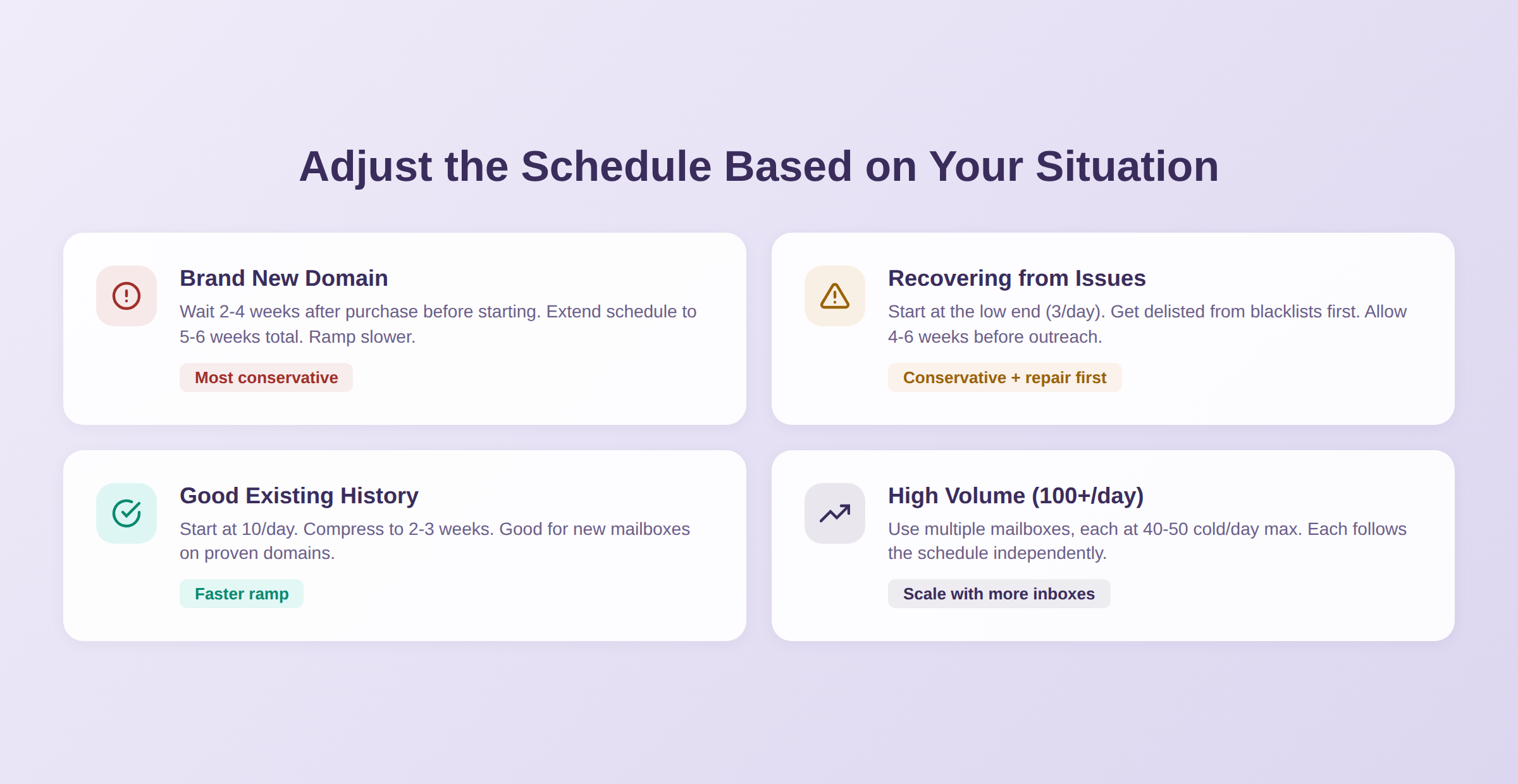
If your domain is less than 2 weeks old, let it sit before starting warmup. Providers are extra cautious with fresh domains since spammers burn through new ones constantly. Wait 2 to 4 weeks after purchase before you begin.
Once you start, follow the standard schedule but consider extending to 5 or 6 weeks before reaching full cold outreach volume. New domains benefit from a longer, more gradual ramp. Learn more: How to Warm Up a Domain (step-by-step).
If your domain has been flagged, blacklisted, or has a history of spam complaints, be more conservative. Start at the lower end of each range (3 per day, not 5) and ramp slower. Expect 4 to 6 weeks instead of the standard 4.
Before starting, check whether you're on any blacklists and get delisted first. Warming up a blacklisted domain won't work until the underlying issue is resolved.
If your domain has been sending email consistently and has a clean track record, you can be more aggressive. Start at 10 per day instead of 3, and compress the schedule to 2 to 3 weeks. You're not building trust from scratch, just reaffirming it.
This applies when you're adding a new mailbox to an existing domain, switching email providers, or restarting outreach after a short break (a few weeks, not months).
If your target is more than 100 cold emails per day, you need multiple mailboxes. A single mailbox should top out at around 40 to 50 cold emails per day. To send 200 per day, use 4 to 5 mailboxes, each following the schedule independently.
This is where Mailivery's unlimited mailbox pricing makes a big difference. Warming up 10 mailboxes costs $29/month total, not $29 per inbox like most competitors charge. Every plan includes all features with no gating, so you get the same warmup quality whether you're on the Starters plan (200 warmup emails/day), Professional plan (800/day), or Business plan (2,500/day).
Regardless of which scenario fits you, keep these rules in mind:
You don't need complicated dashboards to track warmup progress. Watch these four signals:
Warmup engagement rates: Open rates should stay above 80% and reply rates above 30%. If these drop during the ramp, your warmup tool's network might not be strong enough, or there's a DNS issue.
Cold email inbox placement: When you start cold email in week 3, check where those emails actually land. Send test emails to your own accounts on Gmail, Outlook, and Yahoo. If they're hitting spam, your domain isn't ready for more cold volume yet.
Reputation trending upward: Gmail Postmaster Tools is free and shows your domain reputation over time. You want to see it improve from "Low" or "Medium" toward "High" during the warmup period. If it stalls or drops, something needs attention.
Blacklist status: Run a blacklist check weekly during warmup and ongoing after that. You can follow a perfect schedule and still land on a blacklist because of a bad contact or shared IP issue. Catching it early is the difference between a quick fix and weeks of damaged deliverability.
You can follow this schedule manually by sending emails to friends and colleagues every day and tracking everything yourself. It works, but it's tedious and hard to maintain consistently, especially if you're warming up more than one or two inboxes.
Automated warmup tools handle the schedule for you. They manage the daily volume ramp, generate varied content, randomize timing, send and receive replies, and perform engagement actions like marking emails as important or rescuing them from spam. You set it up once and it runs in the background.
With Mailivery, the warmup schedule runs automatically across all your connected inboxes. The tool uses a diverse peer-to-peer network of real inboxes, including big brands, seed mailboxes, CRM users, cold emailers, and more across major providers. This mix means your warmup interactions look like natural email traffic, not a closed loop. You can customize warmup volume, timing, and even use your own templates so the warmup content matches your actual campaigns.
If you're evaluating your options, here's our guide on how to pick the right warmup tool, or see how all the top tools compare in our best email warmup tools breakdown.
Start your 7-day free trial with Mailivery
Most domains need 2 to 4 weeks of dedicated warmup before starting cold outreach. Brand new domains may need 5 to 6 weeks. Domains with existing good reputation can compress to 2 to 3 weeks. After the initial ramp, warmup should continue permanently at a maintenance level.
Not recommended. The first two weeks build the foundational reputation that makes cold email possible. Sending cold email before your domain has any positive history is one of the most common warmup mistakes and can result in immediate spam placement that's hard to recover from.
Start with 3 to 5 and ramp to 40 to 50 over 4 weeks. For ongoing maintenance after the initial ramp, 30 to 50 per day per mailbox is typical. These numbers are per mailbox, so if you have 5 mailboxes, each one follows its own schedule. Mailivery's plans support different daily volumes: Starters at 200/day, Professional at 800/day, and Business at 2,500/day.
A 1:1 ratio is the standard best practice. If you send 40 warmup emails, send 30 to 40 cold emails. Some teams use 2:1 (twice as much warmup as cold) for extra safety on newer or recovering domains.
No. Warmup should run permanently alongside your cold outreach. After the initial 4-week ramp, it shifts to maintenance mode (30 to 50 emails per day). Stopping warmup removes the positive engagement signals that buffer against cold emails getting ignored, and your reputation can degrade within weeks.
First, check your DNS setup. SPF, DKIM, or DMARC misconfiguration is the most common cause. If DNS is correct, the issue is likely with your warmup tool's network quality. Low-quality networks with fake or disposable inboxes produce engagement that providers learn to ignore. Try a tool with a diverse, real-inbox network.
The volume schedule is the same, but Gmail tends to be stricter during the early days. It applies tighter scrutiny to new senders and may take longer to move your emails from spam to inbox. Outlook is generally more forgiving early on but has its own quirks with focused inbox sorting. The schedule accounts for both, but if you see Gmail-specific issues, give it the full two weeks before adjusting.
Yes. Each mailbox follows the schedule independently. If you have 5 mailboxes, each starts at 3 to 5 per day and ramps on its own timeline. With Mailivery, you can warm up unlimited mailboxes on any plan starting at $29/month.

The easiest way to get responses to your cold emails.
