
.png)

Domain warm-up is the process of gradually sending emails from a new or inactive domain to build a positive sender reputation with providers like Gmail, Outlook, and Yahoo. It's essential for anyone doing cold email outreach, whether you just registered a fresh domain or you're bringing an older one back to life. The process typically takes 2 to 4 weeks for domains with some sending history, and 30 to 60 days for brand-new ones.
The key steps are: register your domain and let it rest, set up authentication with SPF, DKIM, and DMARC, start with low daily volume (5 to 10 emails per inbox), ramp gradually over several weeks, and monitor bounce rates, spam complaints, and inbox placement throughout. For a full overview of email warm-up fundamentals, see our complete guide to email warm-up.
The fastest way to ruin a new domain?
Set it up on a Monday and start blasting cold emails by Wednesday. This guide walks you through the warm-up process that actually works in 2026: how to pick and prepare your domain, how to ramp volume safely, what numbers to watch, and what to do when emails start landing in spam.
A domain's reputation is shaped by the history of mail sent from it. A brand-new domain has no history at all, which means inbox providers have zero reason to trust it. Warm-up helps you build that history in a controlled way so providers learn to treat your emails as legitimate.
But you're really warming up three things at the same time:
If any one of these looks unnatural, warm-up won't override it. A domain with perfect authentication still gets flagged if every email looks identical or engagement drops off a cliff.
For a deeper explanation of what warm-up is and why it matters, read What Is Email Warm-Up.
Before you think about warm-up, you need the right domain. This part gets overlooked constantly, and it can make or break your outreach before you send a single email.
Your main business domain (the one tied to your website, your team's daily email, your customer communications) should never be used for cold outreach. If a cold campaign goes sideways and the domain takes a reputation hit, it drags down everything: your support emails, your invoices, your internal communication. Keep your primary domain protected.
Your outreach domain should still look professional and connected to your brand. Use a variation of your company name or something relevant to your industry. If your main domain is acmewidgets.com, your outreach domain could be something like getacmewidgets.com, acmewidgets.io, or tryacme.com. The key is that it looks intentional and trustworthy to the person receiving your email, not like a throwaway domain spun up just for spamming.
Avoid random or generic domains that have no obvious connection to a real business. Inbox providers and recipients both notice.
This is one of the most commonly skipped steps. Don't register a domain and immediately start setting up warm-up the same day. Spammers burn through new domains fast, and inbox providers know it. A domain that was just registered and immediately starts sending email looks risky.
Let your new domain sit for at least 2 to 4 weeks after registration before you begin sending any email from it. During that time, set up a simple website or landing page on the domain, configure your DNS records (SPF, DKIM, DMARC), and create your mailboxes. This resting period gives the domain a small amount of age and an online presence that helps it look legitimate when you do start sending.
Older domains that have been registered for a while but haven't been used for aggressive outreach are a real advantage. They already have some age, which gives inbox providers a bit more to work with. You can typically warm these up faster than a brand-new domain, often in 2 to 3 weeks rather than 30 to 60 days. Just make sure the domain doesn't carry any existing reputation baggage. Check it against blacklists and look at its history before assuming it's clean.
.png)
Once your domain has rested and you're ready to start, make sure these are locked down:
Skip any of these, and you'll warm up the wrong signals. You'll spend weeks building history that doesn't translate into real inbox placement. For step-by-step setup instructions, follow our SPF, DKIM, and DMARC setup guide.
Create branded mailboxes with real-sounding names. Think firstname@yourdomain.com or firstname.lastname@yourdomain.com. Avoid addresses like sales123@ or outreach-team@ because they look automated. If you're running multiple inboxes on the same domain, stagger when you add them. Don't create 10 mailboxes on day one and start warming all of them simultaneously.
There are two safe approaches in 2026. Pick one based on your volume needs and how many inboxes you're managing.
If you only have one or two inboxes and plan to send under 20 cold emails per day, you can warm up manually. Start by sending to internal addresses and a small group of real external contacts who will actually open and reply. After a few days of clean engagement, you can start layering in small amounts of cold email.
The downside: it's slow, it's tedious, and it falls apart once you're managing more than a couple of inboxes.
If you're managing multiple inboxes on a domain, or you're an agency managing client accounts, you need a warm-up tool. But the tool has to produce patterns that look natural to inbox providers.
With Mailivery, you set your target volume and let the ramp-up happen gradually with randomized daily increases. The system keeps sending windows realistic, caps reply rates at natural levels, and varies content so nothing looks templated.
The goal with automated warm-up is simple: make it boring. Predictable, steady, unremarkable sending patterns are what inbox providers trust.
If you're comparing warm-up tools, our best email warm-up tools comparison breaks down pricing, features, and trade-offs. Or if you're trying to figure out what to look for, check out how to choose an email warm-up tool.
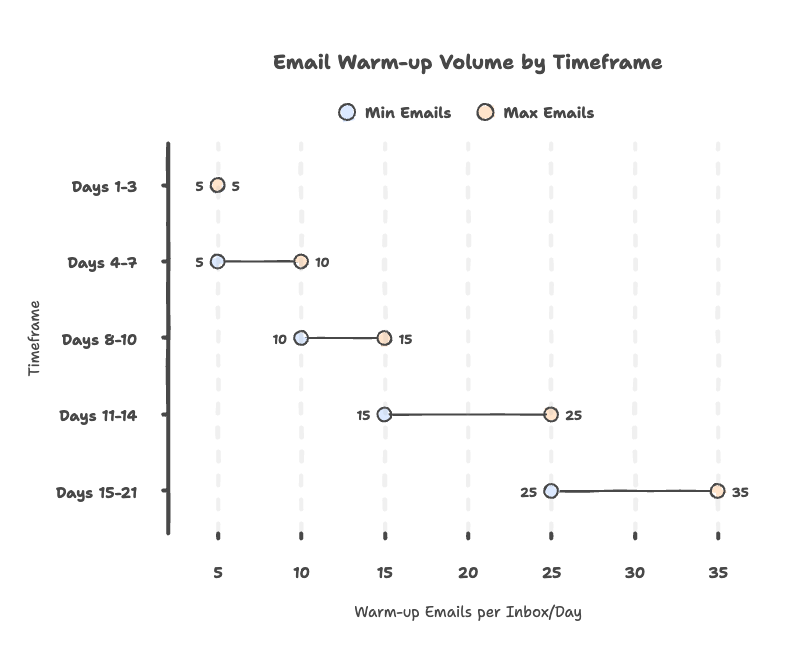
This schedule assumes a new domain that has already rested for 2 to 4 weeks after registration. If you're working with an older domain that has clean history, you can move through the early stages a bit faster.
A few things to keep in mind with this schedule:
Days 1 to 7 are about proving the domain is legitimate. Send only during business hours. Keep reply rates natural (don't aim for 80% reply rates in warm-up, that looks suspicious). Don't send any cold email yet.
Days 8 to 14 are about building consistency. Don't jump from 10 to 30 emails overnight. Keep the daily increases small and slightly irregular. Perfectly linear ramps can look mechanical to inbox providers.
Days 15 to 30 are about matching your warm-up to your real sending plan. If you plan to send 40 cold emails per day per inbox, you want your warm-up volume in that same ballpark. The 1:1 ratio between warm-up and cold email volume per inbox is a reliable guideline.
If you're using Mailivery, you can set your target and enable the ramp-up feature. Daily increases are randomized so volume builds gradually without looking formulaic.
For brand-new domains, consider extending this schedule to 45 or even 60 days before pushing cold email volume. The extra time is worth it. Rushing the ramp is one of the most common reasons new outreach domains get burned.
For more detail on warm-up timing, see how long it takes to warm up an email account.
This is where most domains get burned. People finish two weeks of warm-up and immediately blast 200 cold emails. That kind of sudden volume shift is exactly what inbox providers watch for.
For new domains (the most common scenario in cold outreach): Warm up for at least 30 days. When you do start cold email, begin with 10 to 15 emails per inbox per day at most. Keep warm-up running alongside your campaigns so total daily sending stays stable. Don't judge results off one or two days. Give it at least a week at low volume before deciding whether to scale up.
For older domains with clean history: You can move faster. Warm up for at least 14 days, then start cold volume low and increase gradually. Keep warm-up running to maintain consistent engagement signals.
For domains recovering from deliverability issues: Reduce all sending first. Let warm-up run for at least 3 to 4 weeks with clean engagement before reintroducing cold email. Check why emails go to spam and fix root causes before ramping again.
Warm-up volume isn't the goal. Placement and reputation are. Here's what to track:
Bounce rate is one of the fastest ways to destroy reputation. If you're seeing bounces above 2%, your list needs cleaning before you continue scaling. Mailivery includes built-in email verification to catch bad addresses before they cause damage.
Spam complaint rate needs to stay below 0.3%, which is the threshold Gmail enforces for bulk senders. Even one bad campaign with high complaints can set your domain back weeks.
Spam placement trends tell you whether warm-up is actually working. Don't rely on open rates alone. Open rates can lie if inbox providers are silently filtering you. Run inbox placement tests across Gmail, Outlook, and Yahoo.
Engagement trends matter because replies are a strong positive signal, especially for cold email. If your real campaigns generate replies, that reinforces the trust your warm-up built. Read more about why reply rates drive deliverability.
Provider-level signals like Gmail Postmaster Tools and Microsoft SNDS give you direct insight into how those providers view your domain. Set them up early and check them weekly.
If your warm-up looks great but your real campaigns have bad lists or high complaints, the domain will still slide.
Warm-up adds positive engagement signals, but it's not a counterweight for bad sending behavior. If spam rates climb, more warm-up volume won't fix the underlying problem.
When spam placement increases, the fix is usually:
Reduce sending volume temporarily. Improve list quality right away (verify addresses, remove bounced contacts). Tighten targeting and copy to reduce complaints. Double-check that authentication and alignment are correct. Keep warm-up running, but don't use it as a band-aid.
Warm-up supports reputation. It doesn't erase damage from bounces and complaints. For a full framework on fixing deliverability, see our email deliverability guide.
Starting cold email before warm-up is complete. This is the number one reason new domains get burned. Two weeks of warm-up doesn't mean much if you immediately blast hundreds of cold emails on day 15. For new domains, be patient. 30 days minimum.
Not letting the domain rest after registration. Registering a domain and starting warm-up the same day is a red flag. Give it 2 to 4 weeks with a website and DNS records set up before you start sending.
Jumping volume too fast. Going from 10 to 100 emails overnight doesn't look natural. Inbox providers flag sudden volume spikes. Ramp slowly and keep increases slightly random.
Sending outside normal business hours. Real business communication happens during working hours. If your warm-up runs at 3 AM on a Saturday, it looks automated and suspicious.
Unrealistic reply rates in warm-up. If 90% of your warm-up emails get replies, that's a red flag. Real email doesn't get a 90% reply rate. Good warm-up tools keep reply rates in a natural range.
Warming up gently, then blasting cold volume. The transition from warm-up to cold email needs to be gradual. If you flip a switch from 20 warm-up emails to 200 cold emails, the pattern break triggers filters.
Using your primary business domain for outreach. Never risk your main domain on cold campaigns. One bad campaign could affect all email from your organization. Always use a separate, branded outreach domain.
Ignoring list hygiene. Warm-up can't save you from sending to dead addresses. Hard bounces tank your reputation fast. Always verify your list before sending. Check our guide on email deliverability best practices for more on this.
Using one rigid template everywhere. Providers can fingerprint repetitive templates. If every warm-up email and every cold email looks identical, filters catch the pattern. Vary your content.
If you want domain warm-up to work in 2026, treat it like reputation management, not a one-time setup task. Pick the right domain, let it rest, set up authentication, start slow, keep patterns stable, and ramp gradually.
Most people doing cold outreach are working with new domains, and that's fine. New domains just need more patience. Give yours the time to build a real sending history before you push volume.
A domain with clean authentication, low complaints, low bounces, and consistent sending behavior will outperform a domain that tries to game deliverability with volume tricks every time. Warm-up builds the foundation. Your real sending behavior is what keeps that foundation solid.
Most domains need 2 to 4 weeks of warm-up. Brand-new domains with no sending history often need 30 to 60 days if you want to scale cold email safely. The exact timeline depends on your target volume, inbox provider, and whether the domain has any existing reputation. For more detail, read how long it takes to warm up an email.
Yes. After registering a new domain, let it sit for at least 2 to 4 weeks before sending any email. During that time, set up a website or landing page, configure DNS authentication records, and create your mailboxes. This gives the domain some age and legitimacy before you begin warm-up.
No. Warm-up supports your sender reputation by creating positive engagement signals, but it can't override bad list quality, missing authentication, or high complaint rates. Those issues need to be fixed directly. Warm-up is the foundation, not a rescue tool.
In most cases, yes. As your real sending increases, you can reduce warm-up volume so your total daily sends per inbox stay stable. Keeping some warm-up running helps maintain consistent engagement patterns, which is what inbox providers want to see.
No. Always use a separate domain for cold email. Your primary domain handles too many critical functions (team email, customer support, transactional messages) to risk on outreach campaigns. Register a branded variation of your domain specifically for outreach, and keep your main domain protected.
Domain warm-up builds reputation for the entire domain (yourdomain.com). Mailbox warm-up builds reputation for a specific email address (name@yourdomain.com). In practice, you need both. When you warm up individual mailboxes, you're also contributing to the domain's overall reputation. Most warm-up tools, including Mailivery, handle both simultaneously.
Yes, but be thoughtful about it. Don't add 20 new inboxes and start warming all of them at high volume on the same day. Add inboxes gradually and keep total domain-level volume in check. With Mailivery, you can connect unlimited mailboxes and manage warm-up volume from a shared daily pool, so scaling doesn't mean paying more per inbox.
If you start sending cold email from a domain with no history, inbox providers treat you as an unknown sender. That usually means throttled delivery, spam placement, or outright blocking. Recovering from a bad first impression is harder and takes longer than warming up properly in the first place.
Check three things: your inbox placement rate should be consistently above 90% across major providers, your bounce rate should be under 2%, and Gmail Postmaster Tools should show your domain reputation as "Medium" or "High." If all three look good after your warm-up period, you're ready to start introducing cold email volume gradually.
Yes. Both Google Workspace and Microsoft 365 (Outlook) benefit from warm-up. Each provider evaluates sender reputation differently, but the core principle is the same: gradual volume, real engagement, and consistent patterns build trust. For Microsoft-specific guidance, see our guide on warm-up emails per day for Outlook.

The easiest way to get responses to your cold emails.
