


Last updated: October 2026.
Quick answer: The email deliverability best practices that matter most for cold email in 2026: authenticate every sending domain with SPF, DKIM and DMARC, warm up each mailbox for 1 month (2 weeks minimum), keep cold volume to 20 to 25 emails per mailbox per day, verify every list before sending, and test inbox placement before each campaign.
You can have a clean list, a strong offer and well-written sequences, and still get almost no replies if your cold emails land in spam. For most teams we talk to, the problem starts before anyone reads a word: Gmail and Outlook don't trust the sending domain yet.
These 25 email deliverability best practices are the rules we give Mailivery customers on onboarding and audit calls, grouped into five areas, with the numbers we use. If you're new to warm-up, start with our email warmup guide. If you're already landing in spam and need to find the cause, start with our diagnostic guide to improving email deliverability, which matches each symptom to its fix.

Google and Yahoo made SPF, DKIM and DMARC a requirement for bulk senders in February 2024. Microsoft followed on May 5, 2025, for domains sending more than 5,000 emails a day to Outlook.com addresses. Gmail also enforces a 0.3% spam complaint threshold, and senders who cross it see their mail filtered hard.
For cold email, that means an untrusted domain sends more of every campaign to spam, and pushing more volume through it makes the problem worse. The practices below build trust first and scale second.
Your sending setup decides whether mailbox providers trust you before your first email goes out.
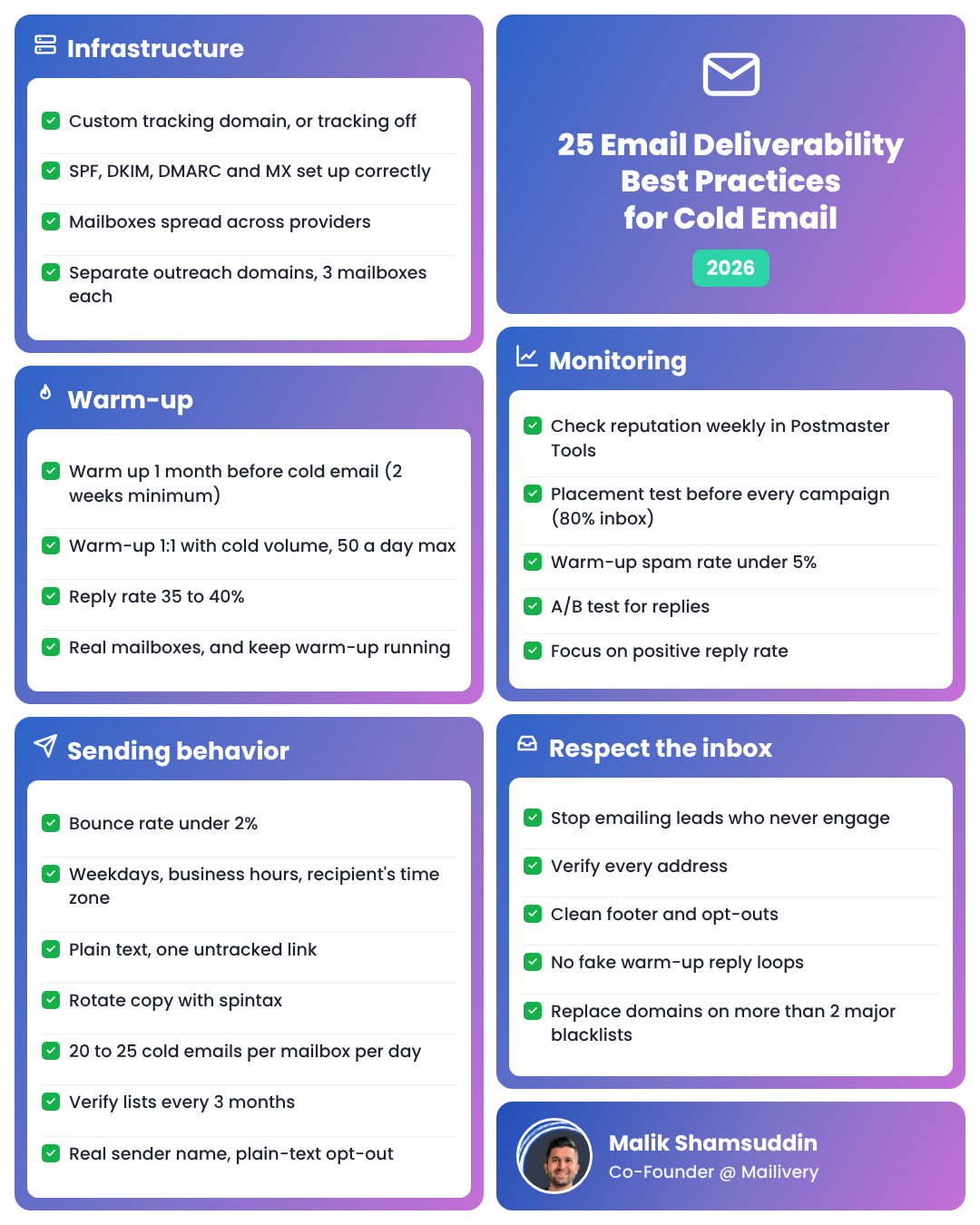
1. Use a custom tracking domain, or turn tracking off. Shared tracking domains carry every other sender's reputation. Our deliverability team sees tracking pixels and tracked links as one of the main reasons cold email lands in spam, so most cold senders are better off with tracking off.
2. Set up SPF, DKIM, DMARC and MX records correctly. Start with SPF, add DKIM, and publish a DMARC policy of at least p=none. Mailivery won't start warm-up on a mailbox that fails its DNS check, because warming an unauthenticated mailbox wastes the effort. Our SPF, DKIM and DMARC setup guide walks through each record.
3. Spread your mailboxes across providers. If one provider or mailbox reseller cracks down, the rest of your sending keeps running. Google Workspace performs best for cold email in our experience, while Titan and Hostinger tend to block accounts sending more than 50 to 70 emails a day.
4. Send from separate outreach domains. Use domains like get<yourdomain>.com for outreach and keep your primary company domain out of it. Put 3 mailboxes on each outreach domain, 5 at most.
Before you send at scale, mailbox providers need to see weeks of healthy, gradual activity from each mailbox.
5. Warm up each new mailbox for 1 month before cold email. Two weeks is the minimum, which matches Mailivery's Fast (14-day) ramp-up. The extra two weeks give Gmail and Outlook a full month of positive engagement before your first campaign.
6. Match warm-up volume 1:1 with cold volume. If a mailbox sends 25 cold emails a day, set warm-up to 25. Keep Google and Microsoft mailboxes at 50 warm-ups a day or less. Our recommended email warmup settings cover custom SMTP mailboxes, which can go up to 2x.
7. Set warm-up reply rate to 35 to 40%. That's high enough to build engagement and close to what a real mailbox sees. Raise it toward 55% only if your spam rate starts climbing.
8. Warm up with real mailboxes and keep it running. Avoid warm-up systems that fake clicks with headless browsers. If we can tell a click came from a bot, Gmail can too. Keep warm-up running alongside your campaigns, because reputation fades when positive engagement stops.
Mailbox providers can tell whether you send like a person or a script, so sending behavior is one of the hardest signals to fake.
9. Keep your bounce rate under 2%. If a campaign crosses 2%, pause it and re-verify the list before sending more.
10. Send on weekdays during business hours in each recipient's time zone. Stagger campaigns across time zones instead of blasting a whole list at once. Weekend sending for B2B outreach starts to look like a red flag.
11. Keep cold emails plain text with one link at most. Skip heavy HTML, embedded images and link shorteners, and leave the one link untracked.
12. Rotate your copy. Mailbox providers fingerprint a template sent at scale within about a month. Use spintax and personalization so no two sends look identical.
13. Keep each mailbox at 20 to 25 cold emails a day, 50 at most. Scale by adding mailboxes and domains instead of pushing more volume through one mailbox.
14. Verify your list before every campaign and re-verify every 3 months. Contact data goes stale fast, and old leads bring bounces and spam traps with them.
15. Use a real sender name, plain subject lines and a plain-text opt-out. No ALL CAPS or spammy phrases. Offer an opt-out like "reply 'stop' and I won't email again" instead of a tracked unsubscribe link.
Monitoring catches problems while they're still cheap to fix.
16. Check domain and IP reputation weekly. Google Postmaster Tools shows your Gmail reputation and spam rate for free. Judge your reputation by Gmail results first, since Outlook placement is unpredictable for most senders right now. Our guide to protecting your sender reputation covers what to do when it drops.
17. Run an inbox placement test before every campaign. An inbox placement test sends your email to seed mailboxes and shows where it lands at each provider. About 80% inbox is normal for a healthy Google Workspace sender. Below 50% points to a reputation problem.
18. Track week-over-week trends. Watch your warm-up spam rate over the last 14 days: under 5% is healthy, under 1% is the goal. A brand-new mailbox can start high and should fall within two weeks.
19. A/B test your campaigns. Keep the version that earns more replies, even if another version gets more opens.
20. Focus on positive reply rate. A reply is one of the strongest engagement signals a mailbox can earn. Our post on reply rate and deliverability explains how inbox providers read replies.
Short-term volume hacks cost you long-term trust with mailbox providers.
21. Stop emailing leads who never engage. Take the contact out when a sequence ends without a reply, instead of starting another sequence.
22. Verify every email address before outreach. One spam trap on a list can damage your whole domain. Mailivery includes email verification credits on every plan.
23. Keep your footer and opt-out signals clean. Honor opt-out replies right away, and keep footers short and consistent.
24. Don't reply to your own warm-up threads or loop fake AI replies. Mailbox providers spot closed loops between the same few accounts.
25. Monitor blacklists and know when to replace a domain. Blacklist monitoring alerts you when a sending domain or IP gets listed. One or two temporary listings usually clear in 14 to 30 days of clean sending. If a domain sits on more than two major blacklists, replacing it costs less than recovering it.
After 2 weeks you should see your warm-up spam rate trending down. Give it 4 to 6 weeks before you judge the full effect on campaign replies. If your placement test results don't improve by then, use our diagnostic guide to improving email deliverability to find which problem is holding you back.
Authenticate your domain with SPF, DKIM and DMARC, warm up each mailbox for 1 month before sending, keep each mailbox at 20 to 25 cold emails a day, verify every list, and test inbox placement before each campaign. Those five cover most of the deliverability problems Mailivery sees on audit calls.
Keep each mailbox at 20 to 25 cold emails a day, and no more than 50. If you need more volume, add mailboxes and domains instead of raising the per-mailbox number. Hosts like Titan and Hostinger often block accounts sending more than 50 to 70 a day.
Mailivery recommends 1 month of warm-up before your first cold campaign, and 2 weeks is the minimum. The same rule applies to Google Workspace, Microsoft 365 and custom SMTP mailboxes.
Keep your bounce rate under 2%. Above that, pause the campaign, re-verify the list and remove hard bounces before you send again, because high bounce rates damage your domain's reputation.
No. Send cold email from separate outreach domains so a bad campaign can't damage the domain your team uses for customers and partners. Keep each outreach domain to 3 mailboxes, 5 at most.
It can. Mailivery's deliverability team sees tracking pixels and tracked links as one of the main reasons cold email lands in spam. If replies matter more to you than opens, turn tracking off and judge campaigns by reply rate.
Mailivery runs warm-up, blacklist monitoring, email verification and inbox placement tests on every plan, with unlimited mailboxes from $29 a month. Start a 7-day free trial or see how Mailivery warm-up works.

The easiest way to get responses to your cold emails.
